Today
Your day, with a head start.
Meetings with briefs, email with drafts to review, and tasks that need your attention. Today brings the next steps together, including suggestions for work you could simplify.

Work your team can see, review, and pick up.
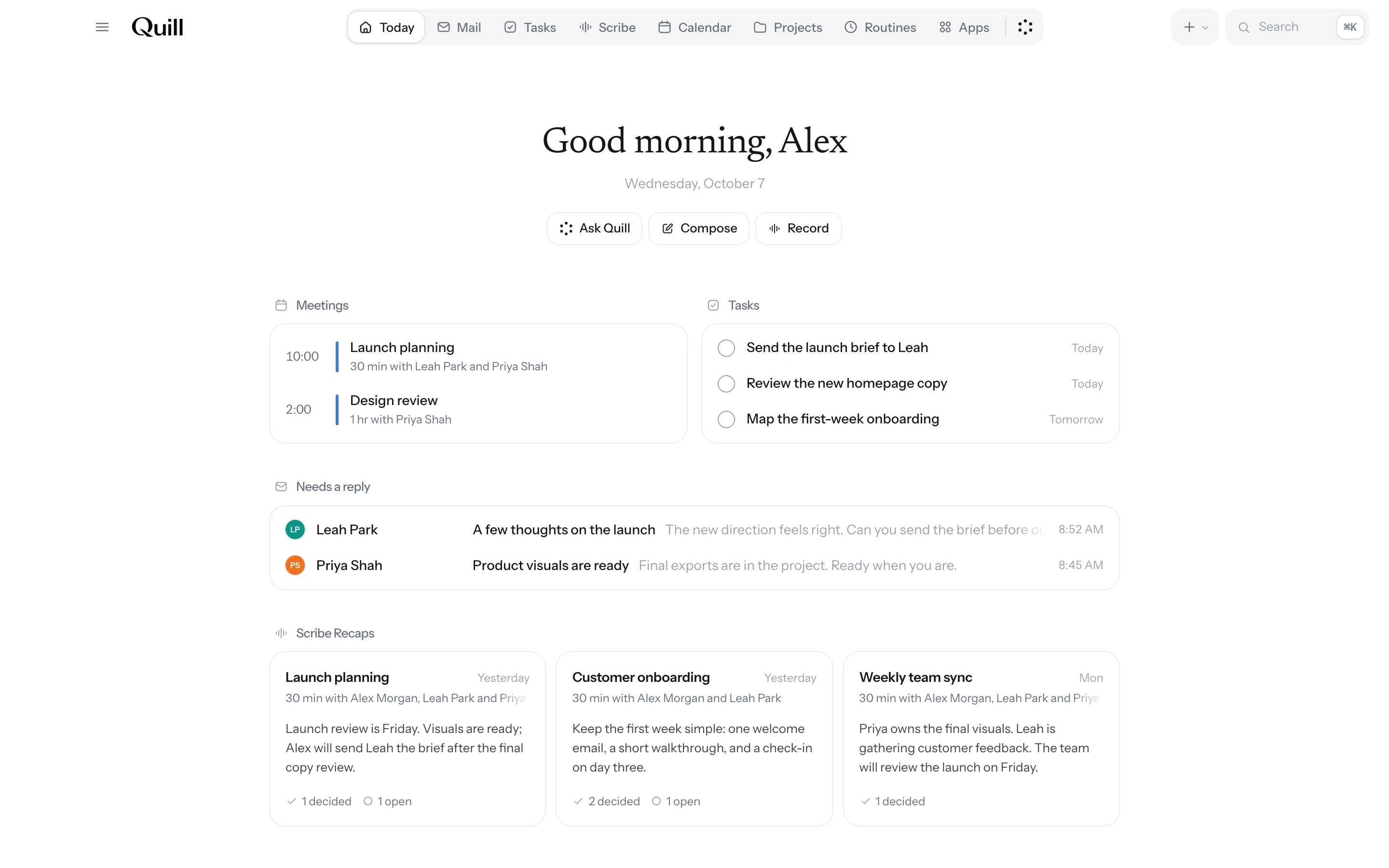
Your email, meetings, tasks, and projects in one shared workspace, connected to the tools you already use.
The interface should fit the work. Chat has a role: asking, explaining, exploring. Quill gives that work a lasting home—and a way to move it forward together.
| Working through a chat | Working in Quill | |
|---|---|---|
| Interface | Through a chatA conversation for each request. | In QuillAn inbox, calendar, and project space suited to the work. |
| Continuity | Through a chatReturn to the conversation to find the answer. | In QuillKeep results with the task, its context, and progress. |
| Teamwork | Through a chatCarry the answer into the team’s workflow. | In QuillAssign tasks across your organization and follow the work. |
Meetings with briefs, email with drafts to review, and tasks that need your attention. Today brings the next steps together, including suggestions for work you could simplify.
Filter out a sender’s promotions without losing their receipts or deliveries. Review the category and matching mail, then clear it in one step.
Stay in the conversation. Scribe keeps the transcript, decisions, and follow-ups together, ready to become tasks.
Give each task an owner, a due date, and the details to act on. Request what you need from a teammate, and it appears on their task list, linked to yours. Ask Quill to help research or prepare the work.
Bring people, tasks, and project details together. See who owns each task and what comes next. Ask Quill to help research or prepare the work.
See Google events alongside your private plans. Find time for the work, and open a meeting straight into Scribe.
Describe the work, review the plan, and choose when it runs. Quill works across your connected tools and keeps the results with the routine. Repeated requests can become suggestions for new routines.
 Ask Quill
Prepare, research, or bring a project up to speed. Quill uses your connected tools and keeps its progress in view.
A handoff needs more than an update. Shared tasks and projects show who’s responsible, what’s been done, and what comes next, so teammates can pick up where you or Quill left off.
A shared place to look
Research and drafts from Quill stay beside the task’s details and progress, ready for teammates with access to review and use.
Waiting on a teammate?
Need final numbers before sending a proposal? Send your teammate a request. It becomes a task on their list, linked to yours. When they complete it, your task is ready to move forward.
A decision you control
When Quill needs approval for an action, the proposed action waits for the person responsible to review it.

Personal boundaries
Joining a workspace doesn’t share your mailbox. Projects and tasks follow their membership and access settings.

Connected apps
Connections run with your permissions. Review what’s connected and disconnect an app when you choose.

Approvals
Consequential actions pause for approval. Review the proposed action in context before Quill continues.

Models
See which model powers each feature and what information it uses, right in your settings.
See how Quill fits into the work you already do.
Meeting follow-up
Take a follow-up from Scribe into Tasks, with an owner, a due date, and the details to get it done.
Inbox cleanup
A promotion and an order update can come from the same sender. Filter out one category, review the matches, and keep the useful mail in your inbox.
Choose once. New matching mail follows your rule.
Ask Quill
“When is my supplier call, and what time is that for her?” Quill checks your connected tools, shows its progress, and brings back an answer with the context behind it.
Keep going with a follow-up, right beside the answer.
Suggested routines and rules
Ask for the same update regularly? Quill suggests a routine. Keep clearing the same sender’s mail? It suggests a rule. Review the suggestion and decide what happens next.
Once you set up a routine, its schedule and results stay together.
Connect the tools you already use, so Quill can help with the work inside them.

Organize the inbox you already use.

Bring your events into the day.

Find the discussion behind a decision.

Work with the pages you share.

Catch up on issues and pull requests.

Ask questions about your spreadsheets.

Look into invoices and expenses.

Use websites with Quill, including signed-in apps that don’t have a connector.

Turn files and connected data into answers, charts, and reports.
And more.
Connect your email, calendar, and the apps your work lives in. Use your existing accounts, choose what Quill can access, and keep using your tools alongside it.
Review a prepared reply, open a meeting brief, or give a task its owner and next step. You don’t need to set up a routine to start.
Invite teammates to a shared project. Use linked requests for the input you need and keep results with the task.
Quill is a workspace for teams, built around email, meetings, tasks, and projects. It prepares replies and meeting briefs for review, connects handoffs between teammates, and suggests routines for repeated requests. Each app has an interface suited to its work.
No. Quill is a new interface on your existing Gmail account. Keep your email address and keep using Gmail alongside it. Google Calendar stays connected too. Start with one email, meeting, or task; you don’t need to move everything at once.
No. Start with your own email, meetings, or tasks. Invite teammates when you want to share a project and follow through together. Joining a workspace does not share your mailbox.
We think the interface should fit the work. Chat is useful for asking, exploring, and explaining. Email needs an inbox. Your week needs a calendar. A project needs owners, status, and next steps. Ask Quill works alongside those interfaces, so you can ask for help while the task, owner, and result stay in view.
Because work already crosses all of them. An email leads to a meeting, a meeting leads to a decision, and that decision becomes someone’s task. We believe the context should travel with the work. Quill connects those steps so the details, results, and discussion have a shared place to live, with access set by what you choose to share.
We believe useful assistance includes knowing when to prepare something. Quill can prepare replies and meeting briefs, and suggest routines or mail rules when it notices repetition. You can also ask directly for help. Prepared work is there to review; a suggestion waits for you to decide whether to set it up.
Joining a workspace does not share your mailbox. Tasks and projects follow their membership and access settings. Connected apps run with their owner’s permissions.
Consequential actions, such as sending a message, pause for approval. Review the proposed action before Quill continues.
Join the waitlist. When your spot opens, we’ll email you a link to download Quill for Mac. Then connect Gmail and Google Calendar and open Today.
Yes. Quill is a desktop app for Mac. Requires macOS 13 or later and supports Apple silicon and Intel Macs.
Connect the tools you already use. Let Quill help you prepare, organize, and follow through.